Friday, 9 October 2015

Comparing Fractions

OK, so your students have mastered the concept of equivalent fractions and it's time time to start comparing fractions - I have made two sketches to help. 

I find that you really need to keep revisiting the fundamentals when advancing a topic; if students forget the basic ideas then everything suddenly becomes very abstract indeed.   I have designed these sketches so that the ideas of how to find equivalent fractions and equivalent fractions being...well... equivalent, are constantly recapped and reinforced.


Chose two fractions to compare by adjusting the sliders.


Click show equivalent fractions.


Move the central sliders to experiment with finding equivalent fractions.


Settle on a common denominator.


Verify the fractions are equivalent by using the top grey slider.


Use the right hand grey slider to make a comparison.


What's the difference?


If you don't like pizza and prefer to eat bars then check the 'model type' box.


I like to mix it up but bars are a fantastic tool for modelling proportions that are easier for students to draw and compare than pizzas! Check out William Emeny's amazing post on bar modelling. I have started to re-design all of my fraction models to offer a bar model but I haven't since tested this one extensively so let me know if you experience any issues.


Next up is comparing multiple fractions and ordering them. Try this:

Show some fractions - how can we go about ordering them?


Maybe some pictures would help (click the 'bars' check-box) - but you wouldn't want to draw them all out by hand every time!


Would finding fractions with a common denominator help? How can we visualise what we are doing here?


Maybe this is too complicated to start with and you just want to compare two or three fractions. Use the left hand check boxes to hide some of the fractions.


You can set up your own fractions - by adjusting the left hand sliders. I always encourage this in my GeoGebra sketches so that you can be dynamic and respond to pupils questions and enable students to visualise any question they like. However in this case, just because it takes a while to dial in all the fractions I have built in five examples that you can access by adjusting the vertical slider on the right-hand side.


I have made the bars drag-able by clicking on the point at the bottom-left corner of each bar. This enables you to put them next to each other to make a closer comparison if you wish.


I have found these sketches to be extremely powerful and would highly recommend you give them a go. If you notices any glitches or have any suggestions for improving them the please just leave a comment. Thanks.


Sunday, 20 September 2015

Understanding the Effects of Coding on Mean and Standard Deviation

Calculating summary stats from coded data has the potential to be to one of the driest topics in statistics - we're talking Weetabix without milk. I referred to my text book for some inspiration;

"Coding is useful as it simplifies the arithmetic of calculating the mean"

Well that's sold it! Please, we live in the 21st century, we have calculators. 

The main purpose of teaching coding data in S1 should be to develop a deeper understanding of measures of central tendency and spread. 

Is the standard deviation and mean of a data set sensitive to the units of the data?
If I have two sets of data that have been recorded using different datums how can I expect this to affect the summary stats?

These are the sort of questions that I want my students to be able of answer - they're not really about churning through calculations; they're about understanding. In addition I want this lesson to lay the groundwork for seeing how and why a data set can be transformed and modeled using a standard normal distribution which is an important later lesson.

I made this sketch to demonstrate what is happening when a data set is transformed/coded.


The $x_i$ data points can be moved around. Just to recap the concepts of mean and standard deviation try moving a point or two and asking the questions How will increasing the value of $x_4$ affect the mean? What about the standard deviation?

You can the start to ask questions about what will happen if the parameter's b or a are changed so that the data set is coded and then use the sketch to examine any predictions by checking the $y_i$, $\bar{y}$ and $σ_y$ boxes. Although I haven't included it on the sketch, don't forget to bring in how variance scales with respect to the standard deviation.

Some nice additional questions to ask are; Will scaling the data always affect the mean? Can you give me an example of a set of data points where changing the parameter $a$ will not affect the mean? Does the data set have to be symmetrical for this to be the case?

I'm not saying this sketch is going to set your coding lesson on fire but some students find coding quite confusing and I have found this visual certainly helps out. Give it a go!


Wednesday, 16 September 2015

Introducing e

$π$, φ, $\sqrt2$, $e$, $i$

You can count the number of mathematical constants that you are likely to have come across in secondary school on one hand - introducing a new one is pretty  rare and special opportunity. For me, Euler's number is the most challenging of these constants to get to grips with. I wanted to make sure that when I introduced e for the first time to my A2 group that I would be able to give them a feel for why this number is so special and not just give them them skills to deal with exam questions in which it features. Here are some ideas on the topic that I would like to share;

A FUNCTION THAT IS ITS OWN DERIVATIVE

As a warm up get pupils doing a bit of differentiating, if they don't yet know about $e$ we're probably just talking polynomials. Tricky question:

Is there a function that is its own derivative?
Could a polynomial function ever differentiate back to itself? 

Most likely you will get a reason based on the power law for why polynomials can't but you may wish to use this sketch to illustrate the point graphically:


An interesting attempt from one of my students based on this sketch was; where $x>0$, $\lim\limits_{ a \to \infty } x^a=f'(x^a)$ ... a nice reminder of how misleading graphs can be if you neglect the scale of the axes and just look at one part of the graph!

Another valiant attempt having not studied derivatives of trigonometric functions was $y=Sinx$. 


What's the gradient of the tangent where $Sinx$  is at a maximum? What is the value of $Sinx$ at this point?... Nice try 

Well they were struggling so I gave them a hint:

$y=a^x$ .... Desmos

You may need to explain how to plot a derivative in Desmos - after defining f(x) you can type in d/dx followed by f(x) or go here:


then type $f(x)$ so you have $\frac{d}{dx}f(x)$.

Rather than Desmos you might want to use this GeoGebra sketch at the board;


This sketch enables you recap differentiation; to take a step back and examine what we are really looking for here.

Set the slider to 4 to plot $y=4^x$ and move the red point (not the slider) along the curve.

Whats happening to the gradient as x increases? 
Hit show tangent and move the red point again.
Now if we plot these values we'd have the function $f'(x)$. Hit trace tangent and again move the red-point.

Now if I decrease the base number (a), what will happen to the the function $y=x^a$?... What will happen to the gradient function?... Un-check 'Trace Gradient' move the slider to 2, then recheck 'Trace Gradient' and move the red dot to explore.


So you as you probably found if we set a to a certain value then f(x)=f'(x)?

2.7 .... are you sure? ... Un-check 'Show Tangent' and 'Trace Tangent' and click 'Show Gradient Function'. Now set a to 2.7. This looks pretty good, lets just look a bit closer. Zoom in (one easy way to do this is by holding shift and using the cursor keys; left/right for the x-axis and up/down for the y)


See if the students can get any closer - now that this value of a where f(x)=f'(x) is so important that we give it it's own letter just like $π$; this time it's not a Greek letter (the first known algorithm for calculating $π$ came from the ancient Greek mathematician Archimedes) it's simply the letter e coined by the Swizz mathematician Euler.  Type in the letter e into the input box for the parameter 'a' (2.72 will appear) then zoom in to validate.(Note you can just type in e for Euler's number in GeoGebra as long as there is no other object defined as e - if you ever get a "redefinition error" press 'alt e' instead). No matter how closely we zoom in these lines will always overlay precisely - there will never be any difference.

Ah but is e actually 2.72, someone may have once told you pi was 3.14, but they were kind of selling you a bit short! Click options; rounding; 15 Decimal Places. Ah that's a bit better but still not the true number; sadly even if I was to write a number on every atom of the universe I still wouldn't be anywhere close to writing out e in full; what type of number do you think it might be?... yes just like $π$ its irrational and also transcendental. 

To change the degree of rounding, on the menu bar click - options; rounding.

OK so that's nice, so you've convinced your students that the function $y=e^x$ has a cool property but where else does $e$ crop up and what is it useful for? Let's explore just one area; growth.


RECAPPING THE CONCEPT OF EXPONENTIAL GROWTH

If students are going to understand the significance of e to growth they first need a solid understanding of exponential growth, lets recap...

I'd start by posing a couple of simple problems -

e.g. You stick £1000 in a savings account offering 5% compound interest per annum. How much will you have in the account after a year?... 3 years?... 20 years?

You can use the following sketch to recap these ideas.


We're talking about discrete growth here, your bank has chosen to pay you interest once a year. What would happen if your bank was to pay you the interest in two, six month installments so that they put half of the annual interest into you account after six months, would this change anything? 

Let's take a closer look....

THE CONCEPT OF A CONTINUOUS GROWTH FUNCTION


The idea for this sketch came from reading Khalid Azad's fantastic Intuitive Guide to Exponential Functions and e - I would highly recommend this if you need to refresh your knowledge before teaching this topic. The idea is ask...

If you have £1 in an account and are promised a return of 100% after a year (some return I know!) then how much would you have after a year?...£2... obviously. On this graph the initial investment is represented in blue and the return in green. 

Now what about if half the interest half is paid after six months and left in the account until the end of the year, how much will you have at the end of the year?

Move the slider to 2.

What does the red bar represent?...It's the interest earn't on the green interest.

How would we calculate this? 


At this point you may need to recap the the basic idea of compound interest;

$$Total = Investment × (100\%+ Interest Rate(\%))^n$$

and discuss that interest rate here as a decimal will be 1 (as we are dealing with 100% return here) divided by n  (the number of time periods we are splitting the year into). Hence you have the formula

$y=\left(1+\frac{1}{n}\right)^n$ 

What would happen if we split the year into three chunks?

Move the slider to 3.

Can you see that little cyan bar?...What does that represent?

Just to make it clear how the colouring works; green is interest earn't on the blue, red is interest earn't on the green and cyan is interest earn't on the red.

What do you think will happen if we keep increasing the number of time chunks? ... Infinite money?...

Move the slider a bit more.

Are you sure?

Ramp it up.

What is that number that the total interest is heading towards? 

It was quite tricky to work out a a way to create this sketch in GeoGebra; in the end I ended up relying on using the spreadsheet function to generate a matrix to control the colored lines (GeoGebra nerds please let me know if yo have a more eloquent solution!). The downside to this method is that the sketch can get quite hungry so I've only shown the first six 'interests' as distinct colors and the rest are shown but are amalgamated into black. This only matters if you try to zoom in which you can do but just be aware of this limitation of the plot if students ask.


The other thing is you can't go for more than 99 increments - the model will sadly break.

Anyhow at this point I would plot up the formula:


$y=\left(1+\frac{1}{x}\right)^x$


to show $e = \lim\limits_{ n \to \infty } \left(1+\frac{1}{n}\right)^n$. 

So e is the maximum amount  you can get by compounding 100% growth on one unit (e.g. a pound), over a time period time period i.e by continually compounding the growth.

So what if you compounded over two time periods?...  $e^2$ ...Three time periods.... Half a time period? 

Hang on a minute we seem to have something here...$y=e^x$ will give us the amount of growth (+the original amount) if we continuously compound. 

You can link this back to a basic compound growth formula;  

$Total = Investment × (100\%+ Interest Rate(\%))^n$

if students don't see why it's $e^x$ rather than $xe$. 

You can now head back to the previous sketch and plot $y=e^x$ to see that this function perfectly models continuously compounded growth (just type $y=e^x$ into the input bar).


Coming back to original question;

What would happen if your bank was to pay you the interest in 6 months installments?

Well yes of course you get more interest and it would be even better if they paid out the amount accrued from continuously compounding interest. They certainly take all of this mathematics into consideration in their models but they usually quote an Annual Equivalent Rate (AER) which tells you how much interest you will get calculated once per year even if they agree to deposit it more frequently.


COMPARING MODELLING FUNCTIONS

So now we have got to the point where we have a function $y=e^t$ that can be used to model exponential growth but it's a bit limited in that so far it can only model continuously compounded growth with an initial amount of 1 and a growth rate of 100%. How could we make this more adaptable to model different scenarios? 

I considered a couple of ways to build rate into the equation but in the end took the textbook route of looking at equivalence between the $y=ab^t$ and $y=ae^{kt}$. To do this they need to be introduced to the natural logarithm and then it can be done in a few steps:

Let's modify our percentage multiplier ($b$) by taking its natural logarithm to give a new parameter ($k$).

$k=\ln{b}$

or in other words

$b=e^k$

Substituting this into $y=ab^t$ yields;

$y=ae^{k^{t}} = ae^{kt}$

Now we have something very similar to $y=e^{t}$ except it contains the extra parameters $a$ (our initial investment) and $k$ which is an alternative growth constant that can be calculated from $b$ using $k=\ln{b}$.  $y=ab^t$ and $y=ae^{kt}$ are identical functions where $k=\ln{b}$ and can both be used to model exponential growth - you can confirm they are the same by plotting them both and watching them overlay. In fact you could use any base to model exponential growth but e is by far the most common and the one you need to be used to dealing with.

In summary we have discovered

A  $y=e^x$ is its own derivative
B  The number e is reached as

$\lim\limits_{ n \to \infty } \left(1+\frac{1}{n}\right)^n$

C  $e$ is the maximum possible result you get if you continuously compound 100% growth  for one time period.
D $y=e^x$ is the function of continuously compounded growth
E  $y=ae^{kt}$can be used to model any form of exponential growth. 
and we've only scraped the surface!

I couldn't resist displaying Euler's Identity and the Gaussian Integral to round of this introduction.

$e^{i\pi} +1 = 0$


$ \int^{\infty}_{-\infty} e^{-x^{2}}.dx = \sqrt{\pi} $

Marvelous


Saturday, 8 August 2015

Introducing Exponential Functions with Bacteria

Here's an idea for introducing exponential functions through the medium of digital bacteria.

Watch this video


In the spirit of Mr Meyer's; Three Act Tasks  ask "what's the first question that comes to mind after watching this video?"

A few of many potential questions;

Is this true?
How can this possibly be true?
How many bacterium would there be after 1 hour, 2 hours... 3 hours?
How many bacterium would there be after a week, a month, a year?
Can we write an equation linking number of bacterium to time?
Do bacteria really multiply like this?
If they do then why don't bacteria cover the entire surface of the earth?

Well we can certainly use GeoGebra to help tackle a few of these.


This sketch will enable you and your students to study some different hypothetical models of reproduction;

Starting with the green bacteria, play the animation; a few questions/tasks;

Sketch a graph of the number of bacterium against time (on mini-whiteboards or paper).
Can you write down an equation linking the number of bacterium to time?
How many bacterium do you predict there would be after 28 days?

If students want to re-examine some specific points in time, you (or they) can just drag the time slider back a bit. Once students have had a go at sketching you can then check the green box in the Graphics 2 window to plot up the number of bacteria. Then if you select the Graphics 2 window by clicking in it you can type a proposed equation into the input bar to validate it.

Uncheck the green boxes and repeat the same sort of thing for the hypothetical blue, pink and red bacteria. One point to note is that the petri dish can start to get pretty crowded and the red bacteria start to overlay each other. If all of the bacteria are shown at once, the other coloured bacteria are set-up to sit on top of the red bacteria so that they stand out - you can zoom in to take a closer look at just how dense the red bacteria are as "t" increases.

If students haven't come across exponential functions before they will probably need some help with the last equation. A nice hint to give is;

Ok so we need a more powerful expression but you need no more than the symbols you have already used, how can you rearrange them:

$+$      $x$      $2$

...$2^x$ I here you say, is that going to be different to $x^2$...why?

You might chose to get them to plot these in Desmos or using the GeoGebra Chrome app to make a detailed comparison.

I like the way that both the Petri dish and the graphs really demonstrate how powerful exponential functions are. Once students have had a go at sketching each of the graphs individually, try getting them to put them all on one sketch. You can use the slider in the Graphics 2 panel to change the aspect ratio so that students can see just how insignificant the other functions become relative to the exponential function as "t" increases.

By this point they should be all set to answer some of the other questions they came up with at the start of the lesson.

Hope you enjoy!


Tuesday, 4 August 2015

Match my Exponential Graph

Inspired by Michael Fenton's fantastic looking "Match my Line" and "Match my Parabola" resources I have created a similar activity to explore exponential functions using Desmos's new activity builder. I haven't actually road tested this yet but when I heard about the release of Desmos's activity builder I couldn't resist giving it a go and thought this would be a great way for students to explore basic exponential functions.


Students have to come up with an equation in the form $y=a^x$ that goes through the coordinate points given in each challenge, there are also a couple of open questions thrown in. They should login at student.desmos.com using the class code that you as the teacher will be assigned to distribute. As the teacher you can then see students graphs and answers and share them for discussion (e.g. the misconception in fifth screen here).


Whilst solving each challenge students can experiment by plotting different graphs, this experimentation is the key to learning through this type of activity; students can quickly identify their own misconceptions and experiment to correct them.

My only concern with these 'Match my ... Tasks' is that students may use sliders to solve the problems very quickly without giving them much thought. Whilst sliders are a powerful tool for visualizing the effect of changing parameters I would like to have the the ability to disable them in certain challenges - I think the cycle of thinking about an equation, manually typing it in, checking its graph and then rethinking the answer is important to allow thinking time for students to develop new concepts. This thinking time may be avoided if the problems are solved quickly using sliders. Hopefully Desmos will make this possible in the future but until then I would encourage students not to use sliders for this particular activity or only a last resort.

I will definitely be trying this out at the first opportunity next year. This activity was really quick and easy to make - why not try creating one yourself ? Let me know how you get on.


Tuesday, 28 July 2015

Curve Stitching

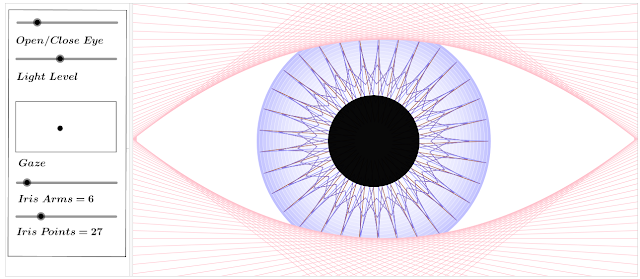
Definitely my most bizarre sketch....


...there's a logical explanation - honest!

Curve stitching is just cool - you start off with straight lines and pretty quickly you get what looks like a curve - its calculus anyone can understand.


String Art - mathcraft

So as a last day of term activity I got students making some designs using curve stitching - we watched this demo, they gave it a go using these templates (courtesy of Mr Chad) and then  progressed onto creating their own designs - It was going down pretty well.

Whilst they were working away I thought it would be interesting to have a go at creating some string art on GeoGebra - I started off with creating the first pattern they had made. It was pretty interesting as I had my screen projected all the time I was doing it and some of the class started to catch on with what I was doing - when I moved the slider a few jaws dropped - " how did you do that"..."algebra!". 


Of all  the times (and there have been a lot!) that I have tried to explain the power of algebra for designing and problem solving I was surprised to see this was the thing that hit it home more than anything. Maybe the reason was that I wasn't actually trying to teach them anything - they just noticed what I was doing and were genuinely interested to learn how - if you can achieve this in a lesson that's a definite success!

I showed them how I had used an equation to create a simple linear sequence that is the basis of the sketch and explained how the coordinates and the line segments are all defined using this sequence. They could really see here how defining objects by using letters (variables) rather than just numbers was powerful.  By the way, the sequence command can be used to sequence all sorts of objects in GeoGebra which makes it an essential command to get to grips with if you want to advance your GeoGebra skills.


I had a look on GeoGebraTube to see if anyone had put any other curve stitching sketches up that demonstrated a generalized form of the the curve stitching patterns some of the other students were sketching. Sure enough I found this nice sketch from Anthony;


Alright so most of the class were impressed by this but the inevitable next questions came..so what, whats the point of this? Why would you ever need to do this? We talked about how algebra forms the basis of CGI  - a couple of students had already said that their curve stitching pictures looked like an eye so I picked on this as an example. We discussed how time consuming it would be to redraw the eye of an animated character in a film every time it adjusted, instead you could make a model based on algebra that could be controlled by changing a few values - yeh but that doesn't really look like an eye sir...I bet you can't make an actual eye. Well after this I had to try! 

Next time I do this  I will have to get the students creating some of their own designs using GeoGebra as some of them were desperate to abandon the paper and pencil approach after I'd shown them my sketch - I'd definitely created a Dan Meyer style headache. I came across this sketch which features some custom curve stitching tools that the prolific contributor John Golden has shared.


The ability to create custom tools like John has done here is a fairly advanced feature of GeoGebra that I will talk about in more detail at a later date but it is very useful when it comes to designing worksheets for students to use.Maybe I will try to figure out a way to get them to start creating their own simple designs from scratch before making it too easy for them with these tools!


So what started as a bit of a fun end of term lesson whilst I got on with a little classroom tidying, turned into one of the most engaging discussions I've had with students about the uses of algebra - thanks to GeoGebra.


Wednesday, 22 July 2015

Single Graph Transformations


I felt like I was jumping the gun a bit with my last post by talking about successive transformations so I thought I aught to take a few steps back. Single step transformations are something I've taught several times to GCSE classes and as part of C2. Some things I've learnt work well are;

1. FOCUS ON GROUPING

As a first task before even looking at any graphs I get pupils to organise the following transformations into sets of first two and then three groups as they see fit:


Getting students to group the transformations gets them carefully examining the equations for similarities and differences and encourages them to look for some structure in something unfamiliar. Later it provides a framework with which to help them understand the different properties of transformations and helps with recalling them. Here is a handout.

For more able groups or as an extension you can add some extras (obviously these need to be considered later anyway but I've found that to much to soon can muddy the picture);


An interesting misconception that often comes out here is that the equations containing  $y=f(x-a)$ and $y=f(x)-a$ should be grouped with $y=-f(x)$ and $y=f(-x)$. They expect because of the presence of the negative symbols these should all belong to one group although mathematically this is hard to justify; at this stage of the lesson I wouldn't correct them but towards the end of the lesson I would draw on this misconception and discuss how $y=-f(x)$ can be considered a special case of $y=af(x)$ with a coefficient of -1.


2. DEVELOP UNDERSTANDING

One approach to demonstrate the effect of the different transformations is to create some tables of values for different functions and plot them (handout here*). This method provides some valuable practice of substitution (which you may need to teach/review first) and is a good way to examine the effects of transformations on specific coordinates. Transformations parallel to the y-axis are intuitive and easily explained and understood but those parallel to the x-axis require more careful thought. Through this activity students can look at the relationships between the rows in the tables and think about why transformations parallel to the x-axis turn out the way they do. This is a challenging concept though so I also like approach it from another angle.

I really like Dan Meyer and Buzzmaths's collaboration; graphing stories. These videos are fantastic for developing an understanding of graphing and they can be extended to the topic of transformations. I like to use 'Height of Waist off Ground'. Play the first part of the video a couple of times and get students to plot the graph (do not use the half speed section). Then play the solution and get them to check it.

"Imagine you are able to look into the future by four seconds. You're watching the scene but seeing whats happening four seconds in the future, so at t=0 what will you see?" Replay the video and ask pupils to plot what they are seeing. "which way has the graph shifted?... If we define waist height above ground as $f(t)$ then what graph have you drawn?.... $f(t+4)$."

"Now imagine again your watching the scene but this time, time in the scene is moving twice as fast so it's as if everything your seeing is moving at double speed, draw what you would see"..."Describe the transformation in words"..."what about in terms of $f(t)$"..."$f(2t)$."

The nice thing about this activity is that without doing any 'real maths' it provides an intuitive understanding of x-direction transformations that students can recall.

3. EXPLORE, INVESTIGATE FURTHER AND STRUCTURE FINDINGS

Calculating tables of values and drawing by hand is pretty tedious but in an ideal world it would be nice to do this for lots of values of 'a' and several functions. This is where graphing software is invaluable.

This simple sketch enables students to put in any function they like and explore what happens as 'a' is changed. This works well in pairs. One student types in a function, and asks the other a 'what will happen if ...?' type question and then checks it using the sketch. Encourage students to be really pedantic when it comes to scrutinizing their partners description. 


Finally I ask students to revisit their diagrams from the first task and consider if they sorted them in the most useful way. To help with this I get them to add the following descriptions into their groups where each description can only be used once but some groups will contain more than one description. Once they have completed this task they can add annotations to their diagrams to explain how to sketch and describe each transformation.


The following diagrams essentially summarize everything they need to know and the groupings make the various transformations easier to understand and remember.


One final thing that I have to mention on this topic is how great Desmos is for transformations.


Desmos is very straight forward to use, it makes graphs look fantastic without any fiddling around. Something like this takes literally 30 seconds to make - find out how here. I really like the table of values feature; you can edit the type of transformation by clicking in the column header. So simple!


* This handout was adapted from TES contributor Kevin Bensley.